

Identifying employees targeted by cyberattacks
Match a list of compromised or exposed individuals against Datafiniti people records to find each person's current employer, then rank the companies most at risk by seniority, industry and company size.
Introduction
By providing a commercially-available database of personally-identifiable information (PII), Datafiniti's People Data can be used to protect companies against potential cyberattacks. Let's learn how!
What this workflow produces
Start with a list of names and email addresses drawn from a breach, a credential dump, a phishing report, or an internal watchlist. By the end of the workflow you have each person's current employer, plus the fields needed to decide which accounts to reset, lock down, or escalate first.
The workflow runs in three stages:
- Match the people. Find each target in the people database using their email and name.
- Enrich each match. Append employment fields such as
businessName,jobTitle, and company size to your target list. - Aggregate and rank. Group the enriched rows by company to see which employers carry the most exposure.
How the match works
A Datafiniti people record describes a single person. The record can hold several email addresses: emails is the combined list of addresses associated with the person, personalEmails holds personal addresses, and professionalEmails and primaryEmail hold current work addresses. Each record also carries firstName, lastName, middleName, city, and province, plus businessName, the current business where the person works. The People Data Schema lists the full set of fields and their types.
An exact email match is the strongest single signal you have. It survives misspelled names, nicknames, and married-name changes, because the address itself is the identifier. When the address in your target list is a personal one (gmail, yahoo, a university domain), the address alone no longer identifies an employer. Pair the name with city or province to separate people who share a common name, then confirm the employer through businessName.
Because a record can list several addresses, searching emails catches professional and personal addresses in one pass. You can also match several people in a single request by joining their conditions with OR. The People Data Schema documents each email field and its type.
Searching against a known target list
If your company provides cybersecurity protection, you likely have access to lists of known compromised individuals. These lists will likely contain name, email, and other identifiers for each person. A list may look like:
Name, Email
Joe Curry, joe.curry@bellideas.com
Tina Harris, tharris@gmail.com
Luis Fiego, luis42@plymouth.edu
You can take information like this and use it to find matching individuals in our people database. For this search we will build a filtered search based on firstName, lastName, & emails. Here's how such a search might look:
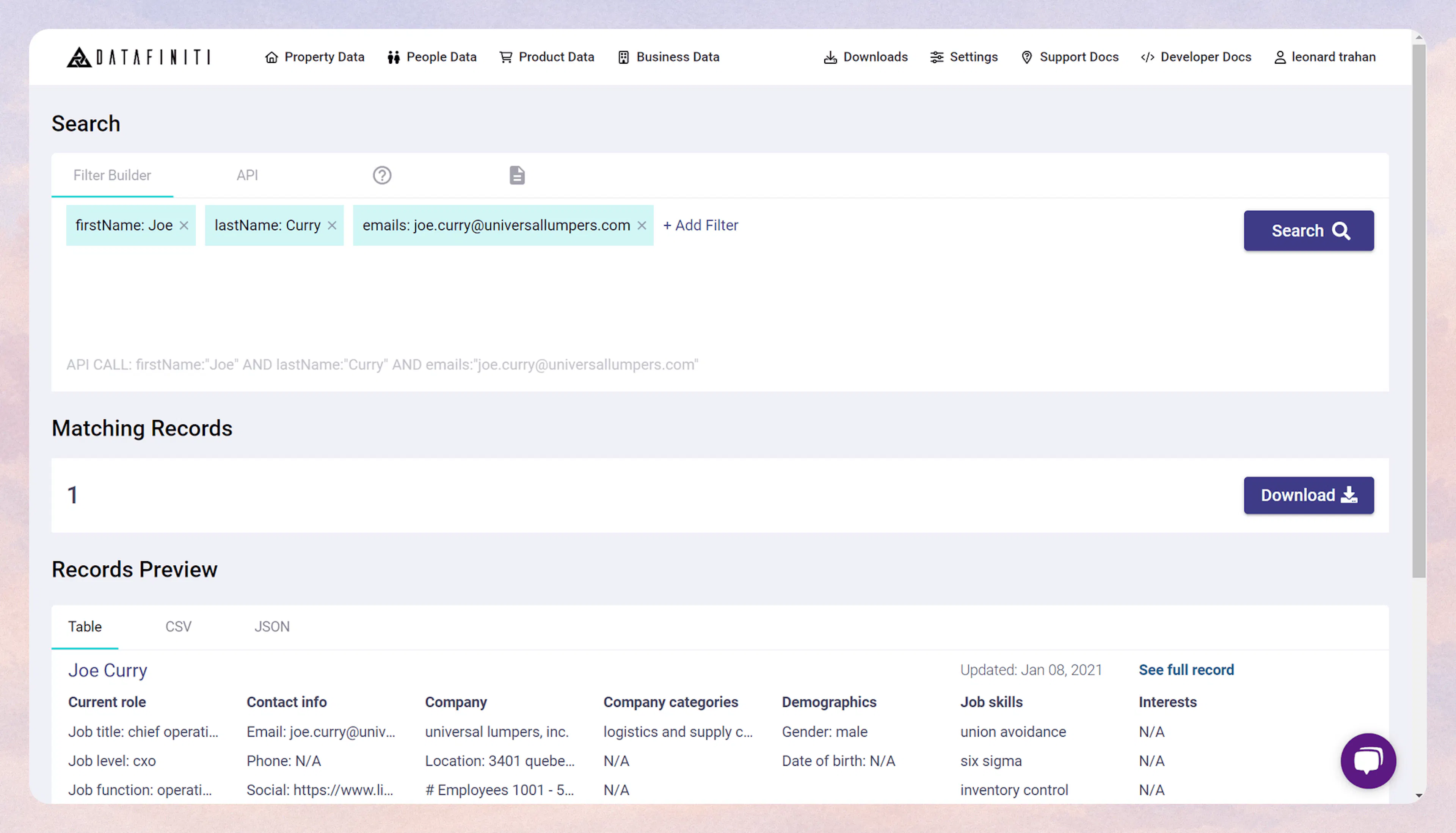
Behind that screenshot, the request body is a filtered query. To match a single person, combine the name with an email:
{
  "query": "firstName:"Joe" AND lastName:"Curry" AND emails:"joe.curry@bellideas.com""
}
To match several people at once, join each person's conditions with OR:
{
  "query": "(firstName:"Joe" AND lastName:"Curry" AND emails:"joe.curry@bellideas.com") OR (firstName:"Tina" AND lastName:"Harris" AND emails:"tharris@gmail.com") OR (firstName:"Luis" AND lastName:"Fiego" AND emails:"luis42@plymouth.edu")"
}
If the email addresses in your target list are the reliable part, drop the name fields and match on email alone. This is the most forgiving option for lists with inconsistent name formatting:
{
  "query": "emails:"joe.curry@bellideas.com" OR emails:"tharris@gmail.com" OR emails:"luis42@plymouth.edu""
}
Target lists drawn from breaches are rarely clean — truncated addresses, duplicated surnames, typos of a single character — and a mistyped address simply returns no match for that person. Run the query with a small num_records first and compare the returned emails and names against your file, so you know which rows resolved before you commit to the full download.
Size the job before you download it
Run the same query first with "num_records": 0 to get a count without pulling records, then request a small sample ("num_records": 10) to eyeball the matches. Only download the full result set once the sample looks right. See Count for how count requests are billed.
Enriching each match
Matching tells you who a record belongs to. Enrichment tells you what to do about it. Append these fields to your target list before you triage, and this is why each one matters:
businessName: the company to act on. This is the field you group by in the next stage.businessCategories: the employer's industry, so you can group similar companies and prioritize critical-infrastructure or financial-services targets first. The allowed values are on Possible Values for People Fields.jobTitle,jobLevel,jobFunction: seniority and role.jobLevelruns fromcxo,vp,director,manager,owner, andpartnerdown tosenior,entry,training, andunpaid.jobFunctionincludes values such asengineering,finance,human_resources,legal, andoperations. An executive account, or an IT or finance account, is worth more to an attacker than an entry-level one, so use these to set priority.numEmployeesMinandnumEmployeesMax: company size, which tells you roughly how many accounts sit behind each compromised company. The ranges run from 1 to 10 up to 10000 and above.dateUpdated: how recently Datafiniti last saw the record. A stale record can point at an employer the person has already left, so flag old rows before anyone is contacted.sourceURLsanddomains: where the record came from.domainsholds the unique domains found in thesourceURLsfield, so it describes provenance rather than the employer.linkedinURLandwebsites: the fields to use when you want to confirm the employer independently of the record.experiences: the list of past employment entries. Each entry carries its ownjobTitle,jobLevel,businessName,numEmployeesMin,numEmployeesMax,city,province,companyFounded, andwebsites. Use it when the currentbusinessNamelooks wrong or the person appears to have moved.industries: categories drawn from the person's previous businesses, useful when you want industry context beyond the current employer.
A match is a strong indicator, not proof
The people database is commercially sourced PII. A record tells you where a person most likely works, not where they work today with certainty. Confirm before you act: check dateUpdated for recency and corroborate the employer with a second identifier such as linkedinURL or a work address in professionalEmails.
A record can also carry several addresses. If the match came from an old or personal email in emails, the businessName may be a company the person has since left.
Aggregating data to identify compromised companies
As you match each person and find their current company, you can append the data to your original file:
Name, Email, Company
Joe Curry, joe.curry@bellideas.com, bell ideas
Tina Harris, tharris@gmail.com, quickpro
Luis Fiego, luis42@plymouth.edu, plymouth university
Once you've done so, you can count up the companies in your updated list to find which companies may be compromised more severely than others.
For larger amount of people data
For anything searching a large amount of people data, we recommend automating this with our Datafiniti People API Search. For more on that you can read more here: People Use Cases.
Running this at scale
When the target list is more than a handful of rows, automate the match, enrich, and aggregate loop through the API instead of working through the portal. That gives you repeatable queries and a full download you can aggregate directly.
The People API Features page covers the request options, Constructing People Queries explains the query syntax, and People Data with Python shows how to drive the API from a script.
To download the full result set as a file, add download, format, and a num_records cap to your query:
{
  "query": "emails:"joe.curry@bellideas.com" OR emails:"tharris@gmail.com" OR emails:"luis42@plymouth.edu"",
  "download": true,
  "format": "CSV",
  "num_records": 3
}
A CSV download puts each people schema field in its own column, so you can group by businessName and count rows in a spreadsheet or BI tool without reshaping the data.
Next steps
For the company-level view, see Identifying companies with employees targeted by cyberattacks, which ranks employers by how many of their people appear on your list. Browse the other workflows on People Use Cases.