

MCP Server
Connect an MCP-aware AI client to Datafiniti through the Model Context Protocol to search, count, and download product, business, property, and people data.
Using Datafiniti's MCP Server
The Datafiniti MCP server lets any MCP-aware client — Claude, ChatGPT, Codex, Cursor, or an agent framework — query Datafiniti's product, business, property, and people data directly. It's one of several ways to use Datafiniti with AI (see the Overview); this one is best when you want an assistant or agent to run queries on its own rather than just help you write them.
MCP and REST return the same data and enforce the same permissions and credit rules, so anything you can do against the REST API you can do here.
When to use MCP
Use the MCP server when:
- Your client supports MCP natively and you want it to execute searches and downloads without a human relaying results.
- You're building an agent that goes from a natural-language goal to a structured data pull in one flow.
If you'd rather have an assistant help you build a query that you run yourself, you don't need MCP at all — see Claude or Other LLMs.
Quickstart
The fastest path to confirming the server works is a single df_count, which returns a match count, spends no credits, and needs no LLM.
- Get your API token from the Datafiniti Web Portal.
- Register the server with your client (see Client setup below), or hit it directly to smoke-test (see Verify the connection).
- Call
df_countwith a data type and a query:
{
  "data_type": "property",
  "query": "country:US AND province:TX"
}
A count comes back with no records and no credit cost — enough to confirm auth and connectivity before you involve a model.
Authentication
The MCP server uses the same bearer token as REST — there's no separate MCP credential. Get your token from the Datafiniti Web Portal.
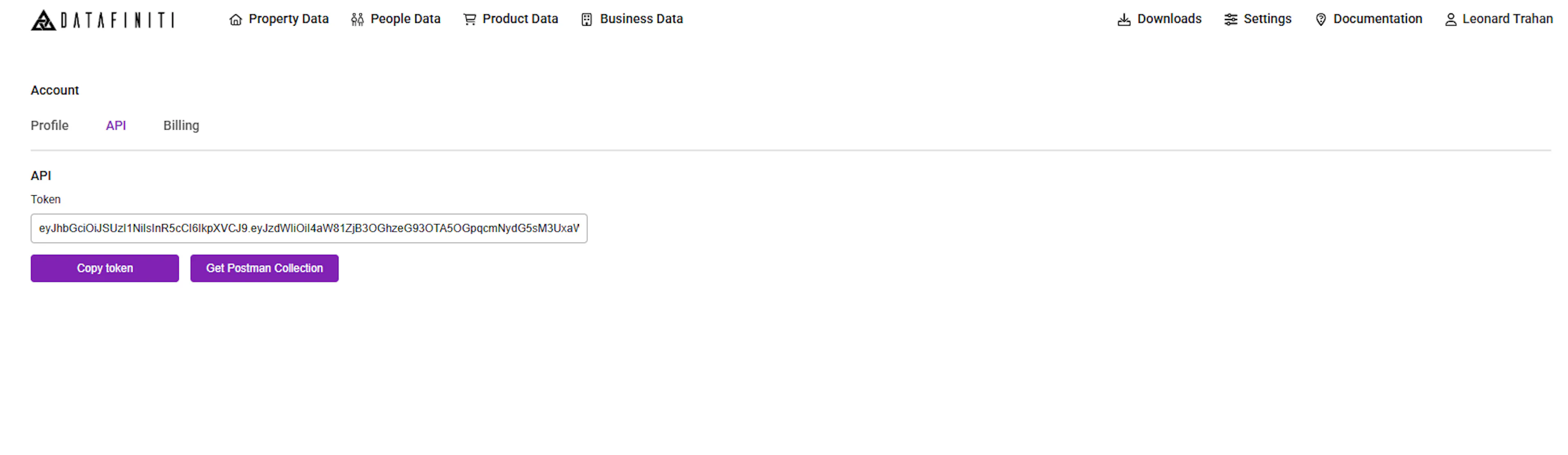
The token authenticates the session and determines your field access and credit accounting, exactly as it does for a REST call.
Keep your token out of source control
Store your token in an environment variable (for example DATAFINITI_API_TOKEN) and reference it from your client config, rather than pasting it into a file you might commit. Your token can spend credits — treat it like a password. For security, it regenerates whenever you change your Datafiniti password.
Client setup
The server is mounted at:
https://api.datafiniti.co/v4/mcp
It uses the Streamable HTTP transport. How you register it depends on your client. In each snippet below, set DATAFINITI_API_TOKEN in your environment first.
Claude Code
claude mcp add --transport http datafiniti https://api.datafiniti.co/v4/mcp \
  --header "Authorization: Bearer $DATAFINITI_API_TOKEN"
Cursor / VS Code / Codex / generic mcpServers config
Most config-file clients accept a mcpServers block. Add:
{
  "mcpServers": {
    "datafiniti": {
      "type": "http",
      "url": "https://api.datafiniti.co/v4/mcp",
      "headers": {
        "Authorization": "Bearer ${DATAFINITI_API_TOKEN}"
      }
    }
  }
}
Client config keys and file locations vary (for example .cursor/mcp.json, .vscode/mcp.json, or a Codex config file). Use your client's documented location for the mcpServers block above; if a field is off, the client will surface a config error you can correct.
Some clients (including claude.ai's custom connectors) don't let you set an Authorization header directly — see the Claude page for that flow. For header-only auth in a client that lacks header support, you can bridge with mcp-remote:
{
  "mcpServers": {
    "datafiniti": {
      "command": "npx",
      "args": [
        "mcp-remote",
        "https://api.datafiniti.co/v4/mcp",
        "--header",
        "Authorization: Bearer ${DATAFINITI_API_TOKEN}"
      ]
    }
  }
}
claude.ai uses OAuth, not a pasted header
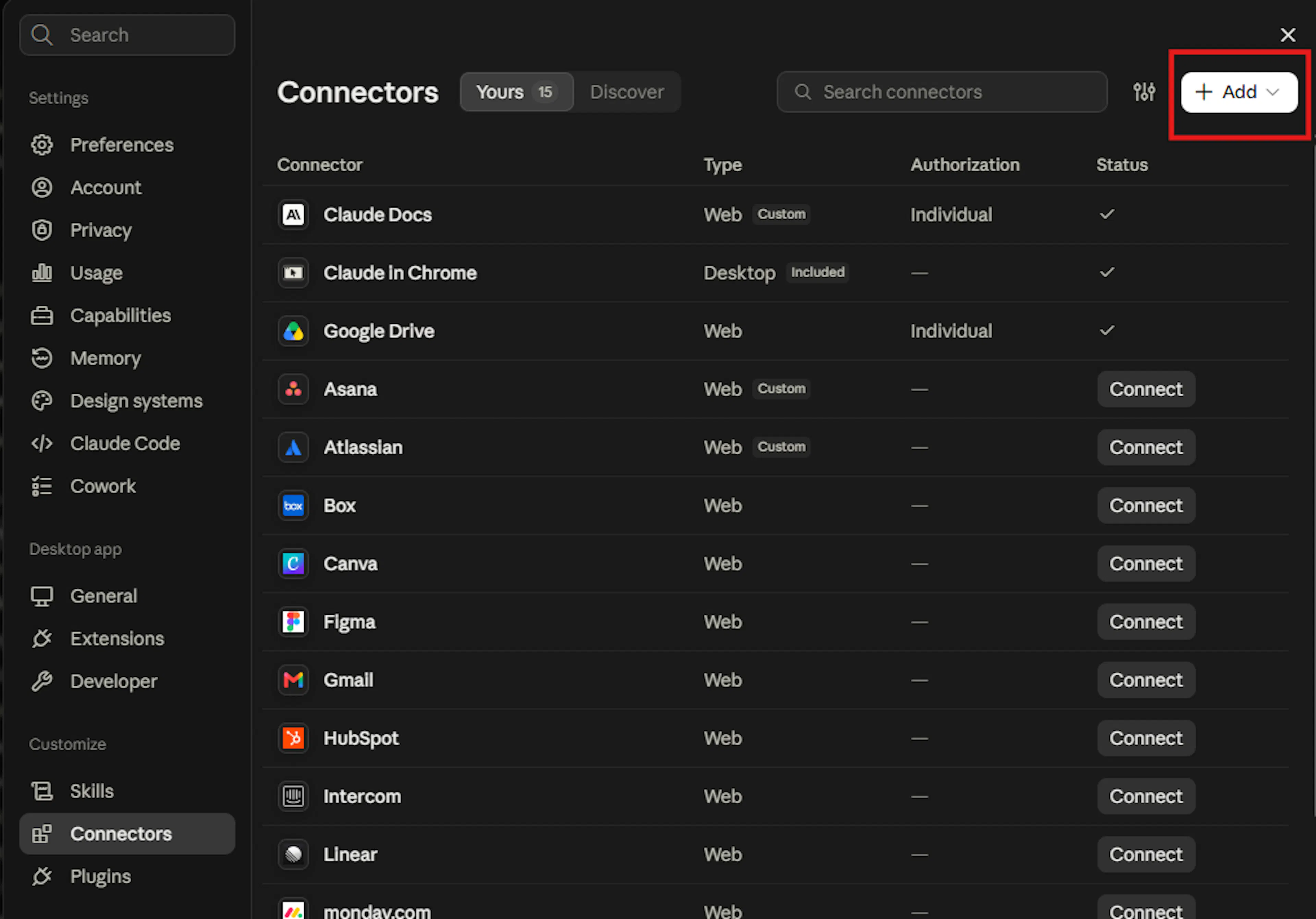
The instructions above are for clients that support a static bearer header (Claude Code, Claude Desktop via config, Cursor, and similar). Connecting from claude.ai uses an OAuth sign-in flow instead — you won't paste a token. See the Claude page.
Verify the connection
Before involving an LLM, confirm the server responds to your token. Streamable HTTP expects both JSON and event-stream in the Accept header.
curl -sS https://api.datafiniti.co/v4/mcp \
  -H "Authorization: Bearer $DATAFINITI_API_TOKEN" \
  -H "Accept: application/json, text/event-stream" \
  -H "Content-Type: application/json" \
  -d '{"jsonrpc":"2.0","id":1,"method":"tools/list"}'
A successful call returns the list of tools. You can also point the MCP Inspector at the server for an interactive check:
npx @modelcontextprotocol/inspector
The server requires bearer-token authentication on every request, including the smoke test above — an unauthenticated call is rejected.
Tools
Every tool takes a data_type parameter naming the data type — property, people, product, or business — which is how a tool call picks the dataset. (REST uses separate endpoints; MCP folds them into one tool set selected by data_type.)
| Tool | What it does | Credits |
|---|---|---|
df_count | Count records matching a query | None |
df_search | Return up to 50 matching records | Charged like REST /search |
df_start_download | Start an asynchronous download of a larger set | See Credits |
df_download_status | Check a download's status and get result-file links | None |
df_get_record | Retrieve a single record by identifier | See Credits |
df_get_schema | Return the field-name-to-type map for a data type | None |
Choosing a tool
Use df_count to size a result set before spending credits, df_search for small or targeted pulls (up to 50 records), and df_start_download when a use case's scope implies many records.
Tool reference
Every tool that reads data takes a data_type parameter — property, people, product, or business — which selects the dataset.
df_count
| Parameter | Type | Required | Description |
|---|---|---|---|
data_type | string | yes | property | people | product | business |
query | string | yes | Lucene query string |
Returns { "num_found": <int> }. No credit cost.
df_search
| Parameter | Type | Required | Default | Description |
|---|---|---|---|---|
data_type | string | yes | — | property | people | product | business |
query | string | yes | — | Lucene query string |
num_records | integer | no | 1 | Number of records to return, up to 50 |
view | array | no | default view | A JSON array of field names, or of {"name": "<field>"} key/value objects |
sort | boolean | no | true | Sort by dateUpdated descending |
fuzzy_match | string | no | 'on' | Fuzzy-matching on the address field. Property and business only — see Fuzzy match scope |
Returns { "num_found", "total_cost", "records": [...] } — the same shape as a REST search.
num_records************************ defaults to 1
If you don't set num_records, df_search returns a single record. Set it explicitly (up to 50) when you want more.
df_start_download
| Parameter | Type | Required | Default | Description |
|---|---|---|---|---|
data_type | string | yes | — | property | people | product | business |
query | string | yes | — | Lucene query string |
format | string | no | — | Output format — JSON or CSV |
view | array | no | default view | As in df_search |
Returns a JSON download response object describing the newly created download, including its download id. Poll that id with df_download_status.
Download size is set by your plan
The number of records a download can return is governed by your Datafiniti subscription plan, not a fixed MCP limit. Check your plan's record limit under subscription settings.
df_download_status
| Parameter | Type | Required | Description |
|---|---|---|---|
download_id | string | yes | The download id (a numeric string) returned by df_start_download |
Returns the download's status — one of queued, running, completed, or cancelled — and, once completed, links to the result files. No credit cost.
Result links expire after 7 days
Download result-file links are valid for 7 days. After that, re-run the download to regenerate them.
df_get_record
| Parameter | Type | Required | Description |
|---|---|---|---|
data_type | string | yes | property | people | product | business |
id | string | yes | The Datafiniti record id |
Retrieves a single record by its Datafiniti id. Costs 1 credit per record.
df_get_schema
| Parameter | Type | Required | Description |
|---|---|---|---|
data_type | string | yes | property | people | product | business |
Returns the field-name-to-type map an agent needs to write a valid query. No credit cost. See also the schema and possible-values links under Querying.
Run a query
Call df_search with a data type, a query string, and a record count:
{
  "data_type": "property",
  "query": "country:US AND propertyType:"Single Family Dwelling"",
  "num_records": 10
}
The response contains num_found, total_cost, and a records array — the same shape a REST search returns.
Quoting exact-match values
Exact-match values use double quotes in the query: propertyType:"Single Family Dwelling". Those are query syntax, not JSON. When an agent calls the tool, its client serializes the arguments and handles escaping for you. Only when you're hand-writing the JSON arguments do you escape the inner quotes as \" — as in the example above. Avoid double-escaping (\\").
Querying
The server exposes Datafiniti's full query syntax to the client: boolean operators, negation, parentheses, nested-field dot notation, ranges, and the compound {} syntax for matching multiple sub-field requirements within a single nested object.
Construction guides:
Property
Build property queries — fields, statuses, and range syntax.
People
Build people queries — titles, contact fields, and linked properties.
Product
Build product queries — nested prices, descriptions, and reviews.
Business
Build business queries — categories, revenue, and geolocation.
Schemas
(field names and types — pair these with df_get_schema):
Property
Property data schema — all field names and types.
People
People data schema — all field names and types.
Product
Product data schema — all field names and types.
Business
Business data schema — all field names and types.
Possible values
Possible values pages for each data type. (People data has no possible-values page):
Property fields
Exact enum values for property fields — statuses, types, and more.
Business fields
Exact enum values for business fields — categories and more.
Product fields
Exact enum values for product fields — categories, conditions, and more.
Views
The view parameter on df_search and df_start_download controls which fields come back. Pass a JSON array — either of field-name strings, or of {"name": "<field>"} key/value objects. Nested sub-fields use dot notation in the field name (for example, "descriptions.value").
Fuzzy match scope
fuzzy_match controls fuzzy-matching on the address field and defaults to 'on'. It is valid only for the address field within property and business data. It has no effect on people or product queries.
Paging past 50 records
df_search returns at most 50 records per call, and a client can page through results up to the total found by the query, to a ceiling of 10,000 records. To retrieve more than 10,000 records — or to pull a large set in one operation rather than paging — use df_start_download instead.
Tips for agents
Models predictably make a few mistakes against these schemas. If you're writing a system prompt or tool description, call these out:
- Confirm field names with df_get_schema (or the schema pages) before building a query, rather than guessing by analogy.
- Property status is split by side. Sale-side values live on
mostRecentStatus; rental-side values onmostRecentRentalStatus. A rental value queried against the sale field returns zero results. - Enum fields need exact values from the Possible Values pages — not paraphrases.
- Count before you search or download to size a result set without spending credits.
Credits
MCP tools spend credits on the same basis as REST, using your token's account.
df_count,df_download_status,df_get_schema— free.df_search— charged per record returned.df_start_download— charged per record requested and found. If fewer records match than the query could return, you're charged only for the records actually found.df_get_record— 1 credit per record.
To keep spend predictable: run df_count first, keep num_records low while iterating (it defaults to 1), and reserve df_start_download for when you actually need the full set. If a call returns credit_limit_exceeded, your account has hit its credit limit and the query was not fulfilled.
Limits
- Records per
df_searchcall: 50. - Records via paging (
df_search): up to 10,000 total for a query. Beyond that, usedf_start_download. - Records per download (
df_start_download): governed by your subscription plan, not a fixed MCP cap. - Download link lifetime: 7 days.
- Rate limiting: Datafiniti reserves the right to restrict, limit, throttle, or suspend API access at its discretion, and to protect infrastructure from unreasonable load, as described in the API Usage section of the Terms of Use. Don't attempt to circumvent throttling or suspension (for example, by rotating IPs) — that's a Terms violation. Build clients to back off and retry rather than hammer the endpoint.
Errors
When a call fails, the server returns a structured error object in the response body rather than a bare status code or loose string:
{
  "code": "invalid_query",
  "message": "…",
  "field": "query"
}
Branch on the stable code rather than string-matching message.
| Code | Meaning | Retry? |
|---|---|---|
invalid_type | Unknown or missing data_type | No — fix the value |
invalid_enum | A value isn't in the field's allowed set | No — use a Possible Values entry |
missing_required_field | A required parameter is absent | No — add it |
out_of_range | A numeric/date value or count is out of bounds | No — adjust |
unknown_field | Query references a field that doesn't exist | No — check the schema |
invalid_field | Field can't be used this way | No — check the schema |
invalid_query | Query string is malformed | No — fix syntax |
invalid_view | View references an invalid field/shape | No — fix the view |
not_found | Requested record doesn't exist | No |
credit_limit_exceeded | Account credit limit reached | No — not until credits reset/raised |
plan_restriction | Your plan doesn't allow this | No |
feature_not_enabled | Feature is off for your account | No |
forbidden | Not permitted for your token | No |
query_runner_error | Backend query execution error (on the query field) | Maybe — transient backend errors may clear |
internal_error | Unexpected server error | Maybe — retry with backoff |
No results is not an error
A query that matches nothing is not an error — it's a successful response with no records found. Don't treat it as a failure to catch. When it happens, broaden or adjust the query until results come back (loosen an exact-match value, drop a restrictive condition, or confirm field names against the schema). Running df_count first is the cheapest way to tell whether a query will return anything.
Auth failures return HTTP 401
A missing, expired, or invalid token returns an HTTP 401, not the structured error object above. Handle 401 separately from the {code, message, field} errors — it means re-check the token, not fix the query.
Prompts
The server ships a library of prompts, each converting a docs.datafiniti.co use-case guide into a ready-to-run query template. A prompt doesn't execute anything itself — it returns a built query and tells the client which tool to run next (df_search for a small, targeted result set, or df_start_download when the guide's scope implies many records).
In many clients, prompts surface as slash commands or a prompt picker. Where a prompt argument has a small, verified value set (such as a property status), it's defined as an enum, so clients that render prompt forms show a dropdown instead of a free-text box.
The prompts available for each data type are listed on that data type's page: Property · People · Product · Business.
Worked examples
For full, end-to-end walkthroughs per data type — count, search, a data-type-specific technique, and a download — see:
Property Examples · People Examples · Product Examples · Business Examples
Troubleshooting
tools/list**************** returns nothing / connection refused — re-check the URL and that yourAcceptheader includes bothapplication/jsonandtext/event-stream. Try the cURL smoke test.- 401 / auth error — confirm
DATAFINITI_API_TOKENis set and current; it regenerates on password change. - A client won't accept the
Authorizationheader — use themcp-remotebridge, or the OAuth flow on the Claude page. - Queries return zero unexpectedly — a zero-result query isn't an error; adjust it. Check for a rental status queried against the sale field, an enum value that isn't in Possible Values, or a field name that doesn't match the schema. Run
df_countto test changes for free.
Next steps
- Test the connection by hand: Verify the connection.
- Per-client details: Claude · ChatGPT / Codex · Postman.
- Data-type walkthroughs: the "…with AI" and Examples pages above.