

Product Data with GPT
Build Datafiniti product queries with ChatGPT or Codex — in a plain conversation you run yourself, or through a connected tool call.
ChatGPT / Codex — Product Examples
ChatGPT connector awaiting OpenAI approval
The Datafiniti ChatGPT connector is still awaiting approval from OpenAI. Until approved, the MCP and tool/action integration paths described below may not be available in ChatGPT or Codex. The plain-conversation approach works regardless of approval status. You can also connect manually by configuring the Datafiniti MCP server yourself — see the MCP Server guide for instructions.
This guide shows how to get product data out of Datafiniti using ChatGPT or Codex. It leads with the plain-conversation path — where the model writes a query and you run it — then shows the connected form for when the model calls Datafiniti directly. For the three ways to wire this up (MCP, tool/action, or plain chat), see the ChatGPT / Codex page.
For the field reference behind these queries, see the Product Data Schema, Constructing Product Queries, and Possible Values for Product Fields.
The goal
We want Apple laptops with their pricing — and we'll have the model build the query, then run it ourselves.
Build the query in conversation
You don't need any integration. Paste in the product query guide and the possible-values page, describe what you want, and let the model draft the query.
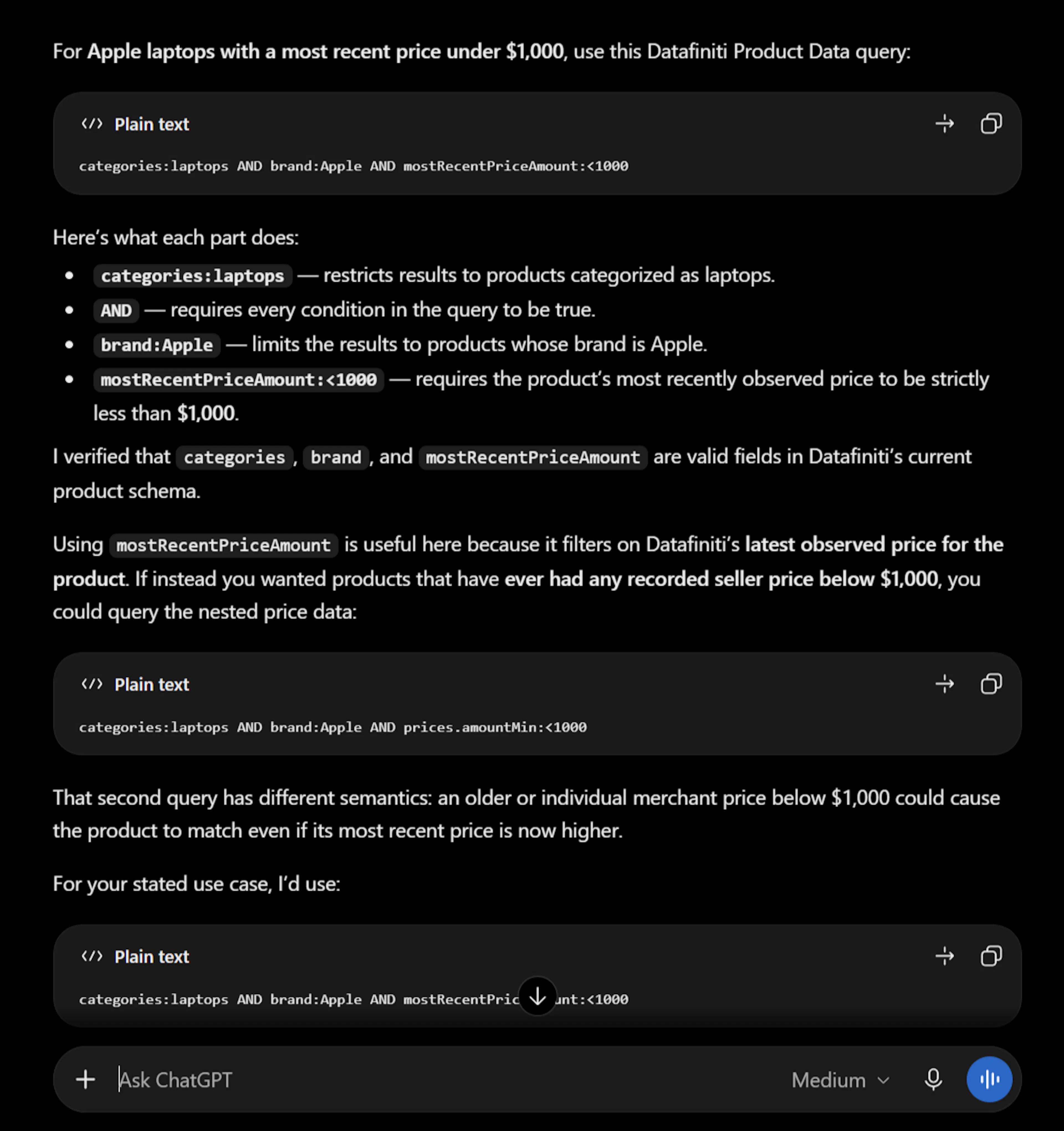
You: Using Datafiniti product data, build me a query for Apple laptops, and include a price filter under $1,000. Here's the product query guide and possible values: [paste or link the guides]. Explain each part.
Model: Here's the query:
brand:Apple AND categories:laptops AND prices:{amount:[* TO 1000] AND currency:USD}
brand:Apple AND categories:laptopsmatches Apple products categorized as laptops.prices:{amount:[* TO 1000] AND currency:USD}uses the compound{}syntax so both conditions must hold for the same price entry — a USD price under 1,000 — rather than being satisfied by two different price records.
Give the model the right context
Product data leans on nested structures — prices, descriptions, and reviews. Paste in Constructing Product Queries so the model uses dot notation for sub-fields (descriptions.value) and the compound {} syntax correctly, rather than a plain AND that would match across separate nested objects.
Run the query yourself
Take the query the model produced and run it in Postman, cURL, or an SDK. Nested sub-fields go in the view as {"name": "<field>"} objects with dot notation:
{
  "data_type": "product",
  "query": "brand:Apple AND categories:laptops AND prices:{amount:[* TO 1000] AND currency:USD}",
  "num_records": 5,
  "view": [{"name": "name"}, {"name": "brand"}, {"name": "prices.amount"}, {"name": "prices.currency"}]
}
In a plain conversation the model only writes the query — nothing is charged until you run it yourself.
Count Tool: let the model run it
If your ChatGPT or Codex environment has the Datafiniti MCP server connected (or the search endpoint registered as a tool), ask the model to run it:
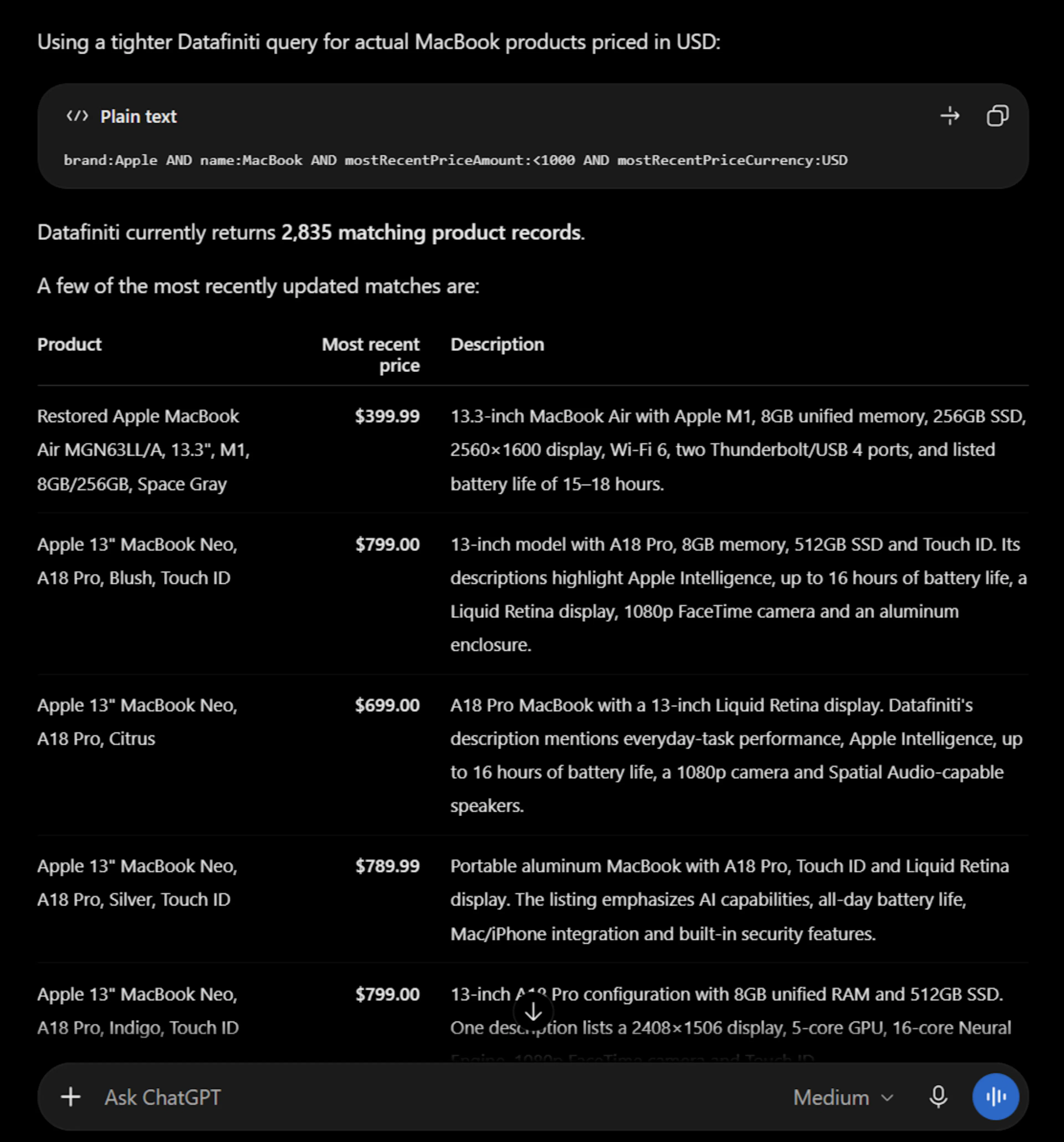
You: How many Apple laptops under $1,000 are there? Then show me a few, and pull their descriptions.
The model calls df_count first (free), then df_search for a sample. For a bulk pull of descriptions or reviews, it uses df_start_download instead:
{
  "data_type": "product",
  "query": "categories:laptops",
  "format": "JSON",
  "view": [{"name": "name"}, {"name": "brand"}, {"name": "descriptions.value"}, {"name": "reviews.text"}]
}
Once connected, searches and downloads charge credits exactly as REST does. See MCP Server for the full tool reference, and Product Data with AI for product fields and prompts.
Narrow to products currently on sale
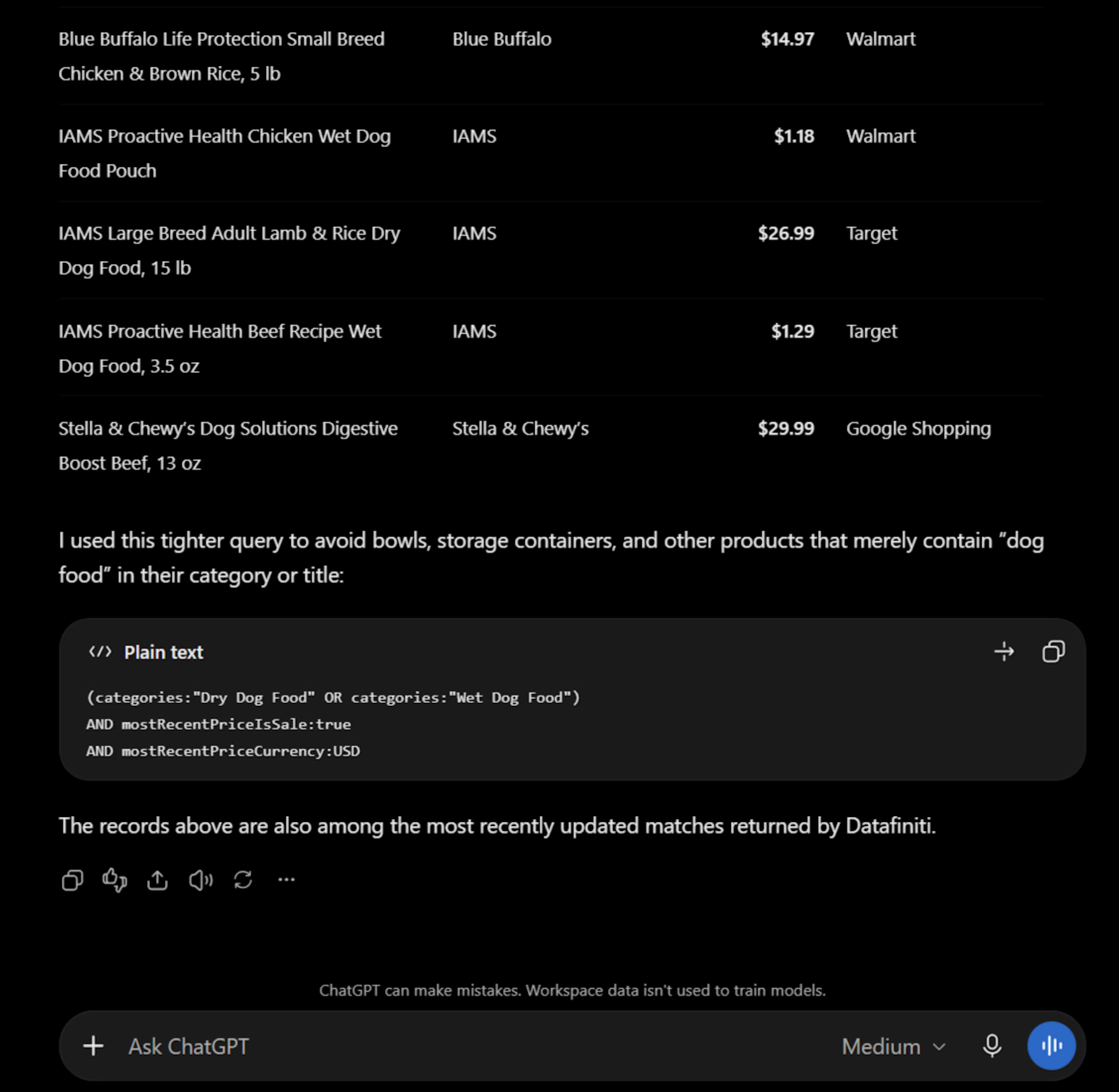
The mostRecentPriceIsSale field is a boolean flag for whether a product's most recent price is a sale price. To limit the pull to pet food currently on sale, the model adds it to the query:
You: Provide a list of pet food for dogs that's currently on sale.
Model:
taxonomy:"pet supplies" AND categories:\"dog food\" AND prices:* AND mostRecentPriceIsSale:*
Most-recent fields are point-in-time
mostRecentPriceIsSale and other "most recent" fields reflect the value at the time of the API call and change over time. For ongoing tracking, re-run the query on a schedule rather than treating one result as permanent.
Pull the pricing data
For analytics you'll usually want the full set rather than a sample, so this is a download. Run it yourself, or have a connected model call df_start_download:
{
  "data_type": "product",
  "query": "taxonomy:"pet supplies" AND categories:food AND prices:*",
  "format": "JSON",
  "view": [{"name": "name"}, {"name": "brand"}, {"name": "categories"}, {"name": "taxonomy"}, {"name": "prices"}]
}
Each returned record carries its full prices array — every observed price with amountMin/amountMax, currency, dateSeen, and merchant — which is what you feed into your pricing analysis. For the full walkthrough, see Pricing Analytics for Pet Food.
Next steps
- Same flow for Property or Business data.
- Wiring options: ChatGPT / Codex.
- Prefer Claude? Claude.